![dtplus-logo-1.png]](https://support.digitaltheatreplus.com/hs-fs/hubfs/dtplus-logo-1.png?width=70&height=70&name=dtplus-logo-1.png)
Digital Theatre+ lets you generate properly formatted academic citations for any resource on the platform — including films, performances, and educational materials — directly from the resource page or search results.
The citation tool supports five academic styles — MLA, APA, Chicago, Harvard, and MHRA — and covers all resource types on Digital Theatre+. Use it for essays, dissertations, and research projects.
Getting Started
Look for the Cite button on any resource page or search result card.


How to Generate a Citation
Step 1: Open the Citation Tool
Click the Cite button on any resource you want to reference. This opens the citation modal where you can customize your citation.
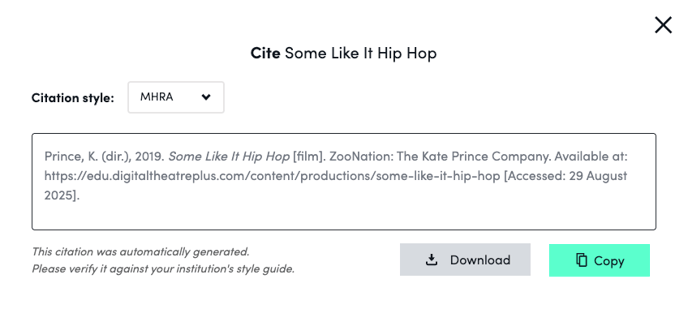
Step 2: Choose Your Citation Style
Select from five major academic citation styles:
- MLA (Modern Language Association)
- APA (American Psychological Association)
- Chicago
- Harvard
- MHRA (Modern Humanities Research Association)
Step 3: Review Your Citation
The citation automatically generates in your chosen style. Each citation includes appropriate media descriptors (Film, Video, Audio, or Web) to ensure proper academic formatting.
Step 4: Copy or Download
To copy your citation:
- Click the Copy button to save the citation to your clipboard
- Paste it directly into your document
To download your citation:
- Choose from three download formats using the download dropdown:
- Plain Text (.txt) - for easy insertion into any document
- BibTeX (.bib) - for LaTeX users and bibliography management
- RIS (.ris) - compatible with reference management software like EndNote, Mendeley, and Zotero
Proxy URL Options
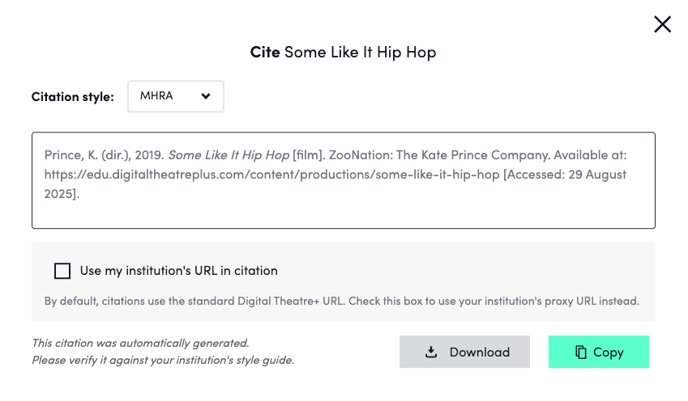
If you access Digital Theatre+ through your institution's proxy server, the citation tool detects this automatically. You can then choose which URL appears in your citations:
- The standard Digital Theatre+ URL (shown by default, recommended for most uses)
- Your institution's proxy URL (check the box to use your proxy URL instead)
Accessibility Features
The citation tool is fully accessible and meets WCAG 2.2 AA standards:
- Navigate using your keyboard with Tab and arrow keys
- Compatible with screen readers
- Clear focus indicators for all interactive elements
- Meets WCAG 2.2 AA accessibility standards
Tips for Using Citations
- Always double-check your institution's specific citation requirements, as some departments may have additional formatting preferences
- The citation tool formats content according to standard academic practices for digital media
- Remember to include access dates when required by your citation style
- Consider using the download options to build a bibliography file for longer projects
Need Help?
If you have questions about the citation tool or need help with a specific citation style, contact our support team.