![dtplus-logo-1.png]](https://support.digitaltheatreplus.com/hs-fs/hubfs/dtplus-logo-1.png?width=70&height=70&name=dtplus-logo-1.png)
Digital Theatre+ (DT+) supports Federated Identity sign-in by acting as a SAML Service Provider (SP) registered with major identity federations. To connect, your institution must release the eduPersonPrincipalName attribute to the Digital Theatre+ SP, and users sign in at https://edu.digitaltheatreplus.com.
Digital Theatre+ is available as a Service Provider (SP) for use with Federated Identity providers.
The SP is published via the UK Access Management Federation (UK Federation) with the Entity ID: https://auth.digitaltheatreplus.com
The SP is also exported to eduGain, InCommon, CAF, and the Swedish Academic Identity Federation (SWAMID).
- UK Federation Metadata production aggregate (look for EntityDescriptor ID="uk004104" entityID="https://auth.digitaltheatreplus.com")
- Digital Theatre+ Entity in the eduGain Metadata Explorer Tool (MET)
- Digital Theatre+ Entity metadata in the eduGain Entities Database Explorer
- Digital Theatre+ Entity in the InCommon metadata service
Attributes
- You will need to release eduPersonPrincipalName to our Service Provider. This must syntactically appear as an email address however it does not need to be attached to a mailbox.
Request Single Sign On configuration via Federated IdP (e.g. EduGain, InCommon, UK Access Management)
How do users sign in via Federated Identity?
- Go to
https://edu.digitaltheatreplus.com. - Click Sign In.
- Enter your email address.
- Select your organisation from the list. On subsequent visits, your organisation will be remembered.
- Complete authentication at your IdP. You will then be signed in to Digital Theatre+.
- Go to
- Click Sign In
- Enter your email address
- You will be prompted to select your organisation from the list. On subsequent visits your organisation will be remembered.
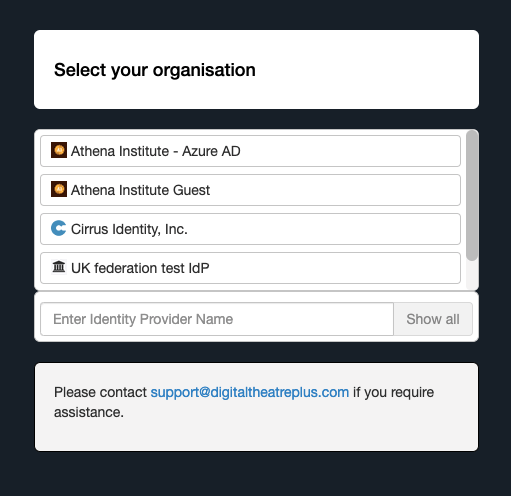
- Once you complete authentication at your IdP, you will be signed into the Digital Theatre+ website.
Deep linking to specific pages
You can deep link to a specific page on Digital Theatre+, bypassing the 'select your organisation' step, by constructing a URL using the following template:
https://digitaltheatre.proxy.cirrusidentity.com/saml2/idp/SSOService.php?spentityid=https://auth.digitaltheatreplus.com&RelayState=<URL TO SPECIFIC RESOURCE>?fromAcs=true&IDPList=<YOUR ENTITY ID>Replace the placeholder values as follows:
<URL TO SPECIFIC RESOURCE>— the full URL of the page you want to link to, for example:https://edu.digitaltheatreplus.com/content/productions/allegiance<YOUR ENTITY ID>— the Entity ID of your Identity Provider, for example:https://test-idp.ukfederation.org.uk/idp/shibboleth
- https://digitaltheatre.proxy.cirrusidentity.com/saml2/idp/SSOService.php?spentityid=https://auth.digitaltheatreplus.com&RelayState=<URL TO SPECIFIC RESOURCE>?fromAcs=true&IDPList=<YOUR ENTITY ID>
- You will need to replace the following values:
- <URL TO SPECIFIC RESOURCE> - for example: https://edu.digitaltheatreplus.com/content/productions/allegiance
- <YOUR ENTITY ID> - for example: https://test-idp.ukfederation.org.uk/idp/shibboleth
The correctly constructed deep link for the above examples looks like this:
https://digitaltheatre.proxy.cirrusidentity.com/saml2/idp/SSOService.php?spentityid=https://auth.digitaltheatreplus.com&RelayState=https://edu.digitaltheatreplus.com/content/productions/allegiance?fromAcs=true&IDPList=https://test-idp.ukfederation.org.uk/idp/shibboleth
- https://digitaltheatre.proxy.cirrusidentity.com/saml2/idp/SSOService.php?spentityid=https://auth.digitaltheatreplus.com&RelayState=https://edu.digitaltheatreplus.com/content/productions/allegiance?fromAcs=true&IDPList=https://test-idp.ukfederation.org.uk/idp/shibboleth